Check Your Phone Number With Simple USSD in Nigeria
It happens to almost everyone at some point. You pick up your phone, someone asks for your number, and your mind goes blank. Or you just inserted a new SIM card and never noted the number it came with. Or your second line has been sitting unused in a drawer and the number is buried somewhere in a folded piece of paper. Whatever the circumstances, you can always recall your phone number without stress.
Every Nigerian network offers a USSD code that displays your own phone number on screen in seconds. This guide walks through each network and answers a few related questions.
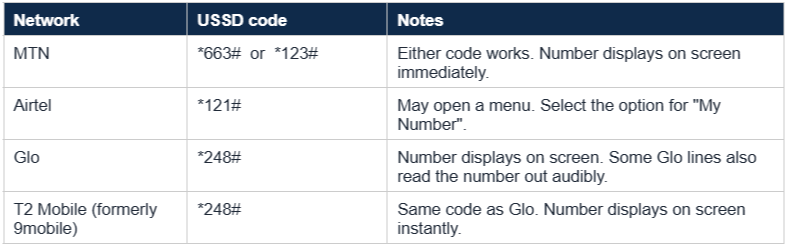
Quick reference: USSD codes by network
Here are the verified USSD codes for checking your own phone number on every major Nigerian network. All four work without airtime or data.
How to check your MTN phone number
MTN offers two USSD codes that both work.
- Open the phone dialler.
- Dial *663# or *123#.
- Press the call button.
- Your MTN phone number displays on screen within a second or two.
If *663# does not respond, try *123# instead. Both go to the same MTN self-service menu. For more on MTN-specific codes, visit the official MTN Nigeria website.
How to check your Airtel phone number
Airtel uses a single USSD code that brings up a self-service menu.
- Open the phone dialler.
- Dial *121#.
- Press the call button.
- A menu appears. Select the option labelled "My Number" or "Account Info". Your Airtel number displays.
Older Airtel lines sometimes show the number directly without the menu step. Either way it works. For the full list of Airtel codes, visit the official Airtel Nigeria website.
How to check your Glo phone number
Glo has the simplest USSD code of any Nigerian network for this purpose.
- Open the phone dialler.
- Dial *248#.
- Press the call button.
- Your Glo number displays on screen immediately. On some Glo lines, the number is also read out audibly.
For more Glo self-service codes, visit the official Glo Nigeria website.
How to check your T2 Mobile (formerly 9mobile) phone number
T2 Mobile rebranded from 9mobile but the USSD codes have not changed.
- Open the phone dialler.
- Dial *248#.
- Press the call button.
- Your T2 Mobile number displays on screen instantly.
The same code Glo uses. For more on T2 Mobile, visit the official T2 Mobile website.
Other ways to check your phone number
If USSD codes are not working (network outage, SIM still being provisioned, or the line is too new), there are alternatives.
- Call another phone - Use the line you want to check to call a friend or a second phone of your own. The number you are dialling from will display on the recipient device.
- Send a WhatsApp message - If the SIM has data and a working WhatsApp installation, your number is visible inside the app under Settings, then your profile.
- Check the SIM pack - The original SIM packaging printed your number on the pack. If you kept it, the number is on the pack.
- Check the SIM tray on iPhone - Some iPhone settings under Settings, then Phone, display the active SIM number. The exact menu name depends on the iOS version.
- Visit a customer care office - Each network has walk-in service centres across Nigerian states. With ID, a representative will retrieve your number.
Frequently asked questions on Checking Your Phone Number
Does checking my number cost airtime?
No. USSD codes for checking your own number are free across all four major Nigerian networks. No airtime or data is deducted.
Why is the USSD code not working?
A few common reasons. The SIM may not yet be fully activated (typically takes a few hours after first insertion). The network may be experiencing temporary issues. You may have dialled the wrong code. Or the SIM may not be inserted properly in the phone. Restart the phone and try again.
Can I use these codes to check someone else’s phone number?
No. The USSD codes only work on the line they are dialled from. You cannot use them to look up the owner of another number. For privacy and security reasons, that information is restricted.
What if my line shows as not registered?
Every SIM in Nigeria must be linked to a National Identification Number (NIN) under NCC regulations. If your line is not registered, the USSD code may fail. Visit any of your network operator’s service centres with your NIN slip to complete registration. For more on the NIN process, see how to verify your NIN on FlipEx.
Do these codes work on any phone model?
Yes. USSD codes work on every phone that can dial numbers, from feature phones to the newest smartphones. No app or internet is required.
What other USSD codes are useful?
Once you have your number, the next things you typically need are checking your airtime and data balance and topping up. See how to check airtime and data balance on MTN, Airtel, Glo and T2 Mobile for the harmonised NCC codes.
Once you know your number
Knowing your own phone number unlocks the basics of self-service on any Nigerian network. From there, the most common next steps are topping up airtime, buying data, and managing your subscription. Nigerians increasingly do all of these from a single app rather than juggling USSD codes for each one.
FlipEx supports instant airtime and data top-ups on all four major networks (MTN, Airtel, Glo, T2 Mobile) from a single wallet. Top-ups are credited within seconds. You can also top up someone else’s number, share data across lines on the same network, and pay bills from the same app. See how to buy airtime and data on all networks in Nigeria with ease, or skip straight to the FlipEx airtime product page to get started.