USDT Networks Explained: TRC-20 vs ERC-20 vs SOL vs BEP-20
Quick answer: Use TRC-20 for most transactions. It has the lowest consistent fees at around $1, confirms in 1-3 minutes, and is the most widely supported. Use SOL if your USDT is already on Solana as the fees are almost zero and the speed is unmatched. Avoid ERC-20 unless you are moving a large amount above $1,000.
If you have ever tried to sell USDT in Nigeria and had to choose between TRC-20, ERC-20, BEP-20, or SOL, you have probably wondered what these actually mean and whether it matters which one you pick.
It matters a great deal because picking the wrong network can cost you tens of thousands of Naira in gas fees on a small transaction. It can also cause your USDT to land in the wrong address and be lost permanently.
This guide explains each network in plain language, compares the fees and speeds, and tells you exactly which one to use based on your situation. FlipEx is the only platform in Nigeria that supports all four networks including Solana (SOL), which no major Nigerian competitor currently supports.
What Is a USDT Network? A Simple Explanation
USDT (Tether) is not a single coin on a single blockchain. It exists simultaneously on multiple blockchains, each running independently. When you send or receive USDT, you are actually moving it on one specific blockchain - that blockchain is what people mean when they say "network."
Think of it like sending money using different courier services. The money is the same, but each courier has different costs, delivery times, and tracking systems. The recipient can only accept the parcel if their address is compatible with the courier you chose.
This is why network selection is so important. If you send USDT on TRC-20 to an ERC-20 address, it is like giving a GIG parcel to a Speedaf driver - such delivery will not happen, and in most cases the funds cannot be recovered.
The Four USDT Networks Supported by FlipEx
FlipEx supports four networks. Here is a plain-language summary of each one before we go deeper:
TRC-20 (TRON Network) — The Nigerian Standard
TRC-20 is the version of USDT that runs on the TRON blockchain. It is by far the most common network used for USDT trading in Nigeria and across Africa.
What is TRC-20?
TRC-20 is a token standard on the TRON blockchain. It defines the rules for how USDT and other tokens behave on that network. When someone sends you TRC-20 USDT, the transaction happens on the TRON blockchain, which is fast, cheap, and widely supported by wallets and exchanges worldwide.
A TRC-20 wallet address always starts with the letter T.
Example: T9yD14Nj9j7xAB4dbGeiX9h8unkKHxuWwb
Every USDT you receive on TRC-20 uses a "T" address.
What is a TRC-20 Address?
A TRC-20 address is simply the wallet address that belongs to the TRON blockchain. It is where USDT on TRC-20 is sent and received. On FlipEx, when you select TRC-20 as your network, the app shows you a TRC-20 deposit address that starts with T. This is the address you give to whoever is sending you USDT.
Gas Fees on TRC-20
Gas fees on TRC-20 are typically around $1 per transaction, paid in TRX (the native token of TRON). This means you need a small amount of TRX in your wallet to initiate a USDT transfer. Most wallets and exchanges handle this automatically, but if you are using a self-custody wallet like Trust Wallet, ensure you have at least 15-30 TRX in your wallet to cover gas.
Confirmation Time on TRC-20
TRC-20 transactions typically confirm in 1 to 3 minutes on the TRON blockchain. FlipEx requires 19 confirmations before crediting your deposit, which happens within this window under normal network conditions.
When to Use TRC-20
- You are sending USDT for everyday amounts (below $1,000)
- You want the lowest consistent gas fee
- You are using Trust Wallet, Binance, Bybit, or most major wallets (all support TRC-20)
- You are unsure which network to pick — TRC-20 is the safest default choice for Nigerian users
Find out more details about TRC-20 Network in this guide.
ERC-20 (Ethereum Network) — Secure but Expensive
ERC-20 (Ethereum Network) — Secure but Expensive
ERC-20 is the version of USDT that runs on the Ethereum blockchain. Ethereum is the oldest and most established smart contract blockchain in the world, which is why ERC-20 is considered the most "official" version of USDT. But this comes at a cost.
What is ERC-20?
ERC-20 is a token standard on the Ethereum blockchain. It is the original standard that USDT was first issued in 2017. ERC-20 USDT is accepted by almost every exchange, wallet, and platform in the world — making it the most universally compatible version.
An ERC-20 wallet address starts with 0x.
Example: 0xdAC17F958D2ee523a2206206994597C13D831ec7
Important: BEP-20 addresses also start with 0x. The two look identical, which is one of the most common sources of confusion when sending USDT. Always check that you have selected the correct network in your wallet before sending.
What is an ERC-20 Wallet Address?
An ERC-20 wallet address is a wallet address on the Ethereum blockchain. When you copy a FlipEx ERC-20 deposit address, it will start with 0x. This address can only receive ERC-20 USDT. Sending BEP-20 USDT to an ERC-20 address will result in lost funds because both addresses start with 0x and look similar, but they operate on completely different blockchains.
Gas Fees on ERC-20
This is where ERC-20 becomes expensive. Ethereum gas fees fluctuate based on how busy the network is. During quiet periods, you might pay $5 to $10 to send USDT. During busy periods, fees can spike to $50 or more for a single transaction. Gas is paid in ETH (Ethereum).
For a Nigerian user sending $50 worth of USDT on ERC-20 during a busy period, the gas fee alone could be $30 to $50. That is more than half the value of the transfer gone to fees. This is why ERC-20 should only be used for large amounts where the fee is a small percentage of the total transaction.
Confirmation Time on ERC-20
ERC-20 transactions typically confirm in 5 to 15 minutes. During periods of high network congestion, this can be longer. FlipEx requires 12 Ethereum confirmations before crediting your deposit.
When to Use ERC-20
- You are sending a large amount (above $1,000) where the gas fee is a small percentage
- Your USDT is already on ERC-20 and bridging it to another network would cost more than the ERC-20 gas fee
- You are dealing with a counterparty or platform that only accepts ERC-20 USDT
- Speed is not a priority and security is your top concern
BEP-20 (BNB Smart Chain) — The Binance User's Choice
BEP-20 is the version of USDT that runs on the BNB Smart Chain (formerly known as Binance Smart Chain). It was created by Binance and is optimised for users who are already in the Binance ecosystem.
What is a BEP-20 Wallet?
A BEP-20 wallet is a wallet that operates on the BNB Smart Chain. Like ERC-20, BEP-20 wallet addresses start with 0x, which makes them look identical to ERC-20 addresses. The key difference is which blockchain they are on. A BEP-20 wallet uses the BNB Smart Chain, which runs faster and with lower fees than Ethereum.
What is a BEP-20 Wallet Address?
A BEP-20 wallet address is the address where USDT on the BNB Smart Chain is sent and received. It starts with 0x — the same as an ERC-20 address. Because the addresses look identical, it is critical to verify that your wallet is set to BNB Smart Chain (not Ethereum) when sending BEP-20 USDT. Sending BEP-20 USDT to an ERC-20 address, or vice versa, will result in lost funds.
Gas Fees on BEP-20
BEP-20 gas fees are very low, typically around N150 per transaction (approximately $0.10), paid in BNB. This makes BEP-20 one of the cheapest options for sending USDT, second only to SOL. If you are a Binance user and your USDT is on BNB Smart Chain, BEP-20 is an excellent choice.
Confirmation Time on BEP-20
BEP-20 transactions confirm in 3 to 5 minutes under normal conditions. FlipEx requires 15 confirmations on the BNB Smart Chain before crediting your deposit.
When to Use BEP-20
- Your USDT is already on the BNB Smart Chain (Binance users who withdraw USDT from Binance on BEP-20)
- You want low fees and already hold BNB to pay gas
- TRC-20 is not available from your sending wallet
SOL (Solana Network) — The Fastest and Cheapest Option
SOL refers to USDT that runs on the Solana blockchain. Solana is one of the fastest blockchains in the world, designed specifically for high-speed, low-cost transactions. It is particularly popular with developers, freelancers, and international payment platforms.
FlipEx is currently the only major platform in Nigeria that supports USDT deposits on the Solana network. This means if someone sends you USDT on Solana from abroad, you can sell it directly on FlipEx without having to bridge it to a different network first.
Gas Fees on SOL
Solana transaction fees are the lowest of any major blockchain, typically less than $0.01 per transaction — that is under N15 in most cases. Gas is paid in SOL (the native token). You only need a tiny amount of SOL to initiate a transfer.
Confirmation Time on SOL
Solana is one of the fastest blockchains available. Transactions confirm in under 1 minute in most cases. For users who need their USDT converted to Naira urgently, SOL is the fastest possible route.
When to Use SOL
- Your USDT is already on the Solana network (received from international freelance platforms, crypto exchanges with SOL support, or on-chain payments)
- You want the absolute lowest gas fee — below N15 per transaction
- You need the fastest possible confirmation time
- You are receiving payment from someone who uses the Solana ecosystem
Who Uses USDT on Solana in Nigeria?
The Solana network for USDT is most commonly used by:
- Freelancers and remote workers receiving payment from international clients through platforms built on Solana
- Crypto traders who hold USDT on Solana after trading on Solana-based DEXs
- Nigerians receiving remittances from family abroad through apps that use Solana rails
- Anyone who has used an international platform that defaults to USDT on Solana.
How to Tell Which Network Your USDT Is On
Before you send USDT to FlipEx, you must know which network your USDT is currently on. Here is how to check in the most common wallets:
Trust Wallet
Open Trust Wallet. On the main screen, look at your list of assets. You will see separate entries for USDT depending on network. You might see "USDT (TRC20)", "USDT (ERC20)", "USDT (BEP20)", and "USDT (SOL)" as separate tokens. The one showing your balance is the network your USDT is on.
Binance
When you tap Withdraw on Binance for USDT, Binance asks you to choose a network. The network shown at the top is the current default. Binance defaults to ERC-20 unless you change it. Check which network you are on before confirming a withdrawal.
Bybit
In Bybit, go to Assets, select USDT, and tap Withdraw. The network selector shows which chains are available. Your USDT is just USDT in Bybit's internal wallet — you choose the network at the point of withdrawal.
MetaMask
MetaMask shows your network in the top-centre of the app. If it says Ethereum Mainnet, your USDT is ERC-20. If it says BNB Smart Chain, it is BEP-20. MetaMask does not support TRC-20 or SOL by default.
The Most Expensive Mistake Nigerian USDT Users Make
The most costly mistake is sending USDT on the wrong network to a receiving address. This happens most often with ERC-20 and BEP-20 because both address types start with 0x and look identical.
Example: You want to send USDT to your FlipEx ERC-20 address. You copy the address correctly. But in your sending wallet, you accidentally leave the network set to BEP-20. The funds are sent to the same-looking address but on a completely different blockchain. FlipEx is only monitoring the ERC-20 address for incoming transactions, not the BEP-20 address. The funds do not arrive.
To avoid this: always read the network label in your sending wallet before confirming. Do not rely on the address alone. The network must match.
Always verify: the network in your sending wallet must exactly match the network you selected in FlipEx before you confirm any transaction.
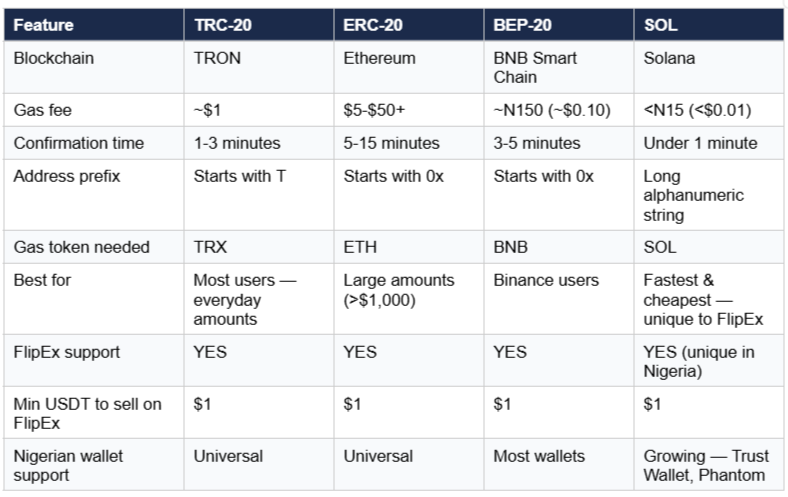
Complete Network Comparison — FlipEx USDT Support
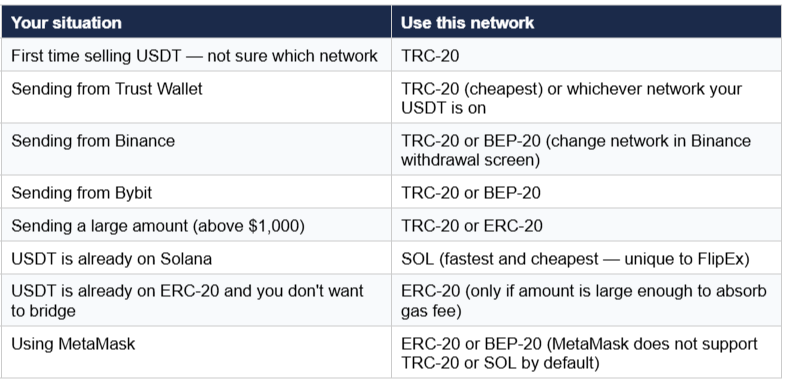
Which Network Should I Use to Sell USDT on FlipEx?
Use this decision guide:
Frequently Asked Questions
What is TRC-20?
TRC-20 is a token standard on the TRON blockchain. It defines how USDT and other tokens work on TRON. TRC-20 USDT is the most commonly used version in Nigeria because of its low fees (around $1 per transaction) and fast confirmation time (1-3 minutes). TRC-20 wallet addresses always start with the letter T.
What is a TRC-20 address?
A TRC-20 address is a wallet address on the TRON blockchain. It always starts with T. When FlipEx gives you a TRC-20 deposit address, it will start with T. You send your USDT to this address from your external wallet or exchange.
What is a BEP-20 wallet?
A BEP-20 wallet is a wallet that operates on the BNB Smart Chain. BEP-20 wallet addresses start with 0x — the same as ERC-20 addresses. This is why it is important to always check which network is selected in your sending wallet, not just the address format.
What is a BEP-20 wallet address?
A BEP-20 wallet address is a 42-character address starting with 0x on the BNB Smart Chain. FlipEx generates a BEP-20 deposit address when you select BEP-20 as your network. Only send BEP-20 USDT to this address — sending ERC-20 USDT to the same-looking address will result in lost funds.
What is the difference between TRC-20 and ERC-20 USDT?
Both are USDT, both are pegged to $1, and both are accepted by FlipEx. The difference is the blockchain they run on. TRC-20 runs on TRON and costs about $1 to send. ERC-20 runs on Ethereum and costs $5 to $50+ to send. For Nigerian users doing everyday USDT trades, TRC-20 is almost always the better choice.
Does FlipEx support USDT on Solana?
Yes. FlipEx is one of the very few platforms in Nigeria that supports USDT on the Solana (SOL) network. This means if someone sends you USDT on Solana, you can sell it directly on FlipEx without converting to a different network first. SOL has the lowest fees (under N15) and the fastest confirmation time (under 1 minute) of any supported network.
What happens if I send USDT on the wrong network?
The funds will not arrive in your FlipEx wallet. In most cases they cannot be recovered. Contact FlipEx support immediately with your transaction hash (TXID). To prevent this, always verify the network label in your sending wallet matches the network you selected in FlipEx before confirming any transaction.
How do I know which network my USDT is on?
Open your wallet and look for the network label next to your USDT balance. In Trust Wallet, USDT is listed separately per network ("USDT TRC20", "USDT ERC20" etc.). In Binance, you choose the network at withdrawal. In MetaMask, your network is shown at the top of the app. The network label tells you which one to select in FlipEx.
Ready to Sell Your USDT for Naira?
Now that you understand the difference between TRC-20, ERC-20, BEP-20, and SOL, you are ready to make the best network choice every time. For a full step-by-step walkthrough of the selling process on FlipEx, see our guide: How to Sell USDT for Naira on FlipEx.
Check the current USDT to Naira live rate on the FlipEx Rate Calculator before you send, so you know exactly what Naira amount to expect.