What Is the Suspicious Token Scam? How to Protect Your Crypto
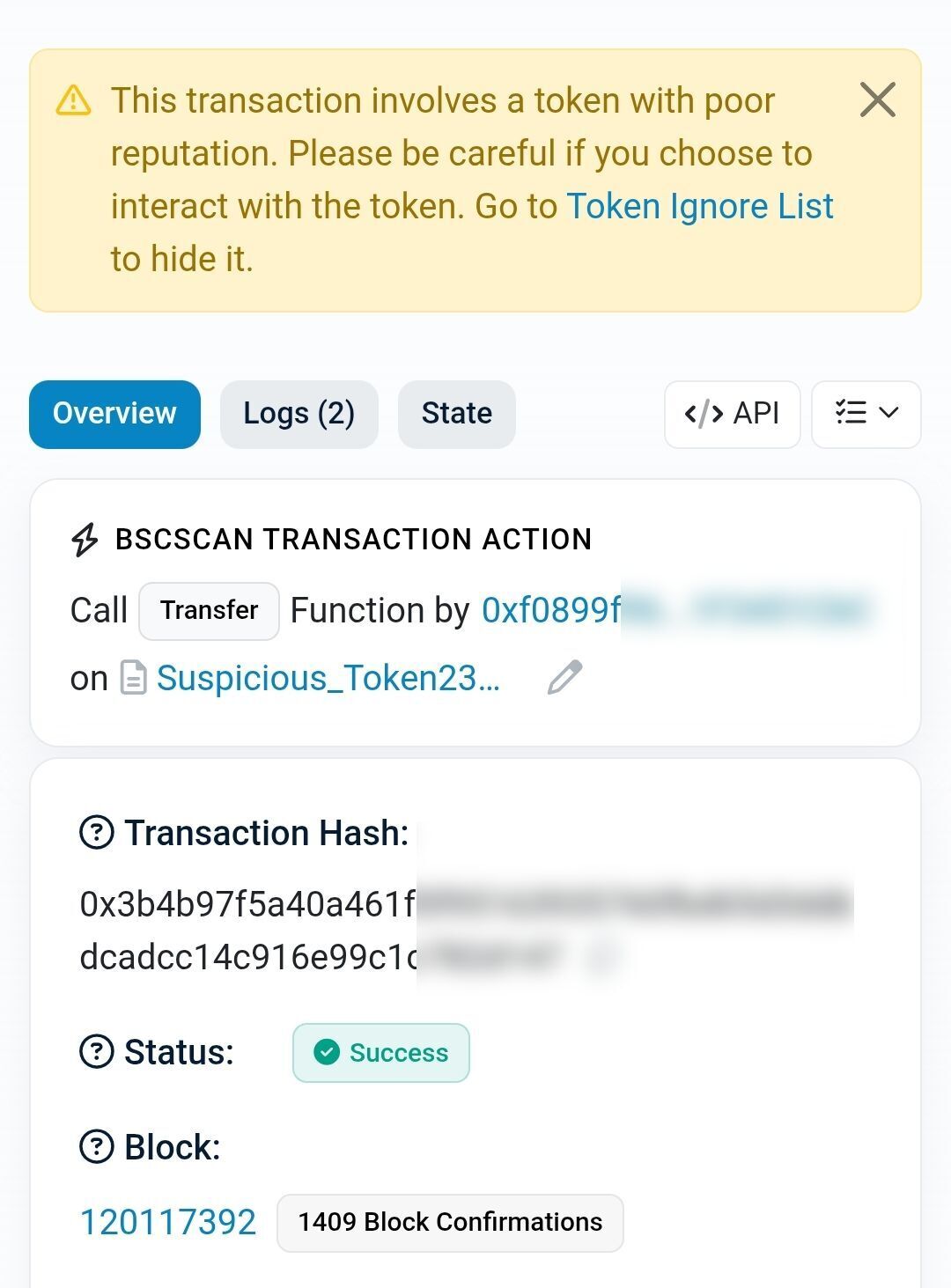
You open your Trust Wallet, MetaMask, or your Phantom wallet and notice a token you have never seen before. It has a name that sounds promising: “USDT Bonus,” “Reward Token,” “Free Airdrop,” or something with a dollar value that looks real.
You could get the token from as a reward from an unverified crypto farming or mining activity, some random platform may pay you via tokens after completing some tasks including watching adverts, referring friends etc. When you get such any token in your wallet, you need to apply extra care.
Do not touch it. Do not try to sell it. Do not approve any transaction related to it.
There is a new token scam that is designed to look like free money so that you interact with it. The moment you interact, the scam activates. This guide explains exactly what the suspicious token scam is, how it works at a technical level, why it targets Nigerian crypto users specifically, and the only correct action to take when you see one in your wallet.
How the suspicious token scam works
The scam operates in three stages. Understanding all three stages is the key to not falling for it.
Stage 1: The drop
A scammer creates a custom token on a blockchain (Ethereum, BNB Chain, Tron, Solana, or any chain with smart contract capability). Creating a token costs almost nothing: a few cents on BNB Chain or Tron, a few dollars on Ethereum. The scammer then sends tiny amounts of this token to thousands of wallet addresses at once.
This is called a dusting attack when the amounts are tiny, or airdrop phishing when the token is designed to look like a legitimate free distribution. Either way, the intent is the same - something shows up in your wallet that appears legitimate
The scammer may get your wallet address from the blockchain itself because every transaction you have ever made is public. If you have ever sent or received USDT, BTC, ETH, or any other token, your address is on-chain and visible to anyone who looks. You may actually provide your wallet details when you participated in a crypto farming, airdrop or other related activities. The point is whether you supplied your wallet details or you randomly got a token, the scammer does not need to hack you. They just need to find your wallet details to send you this fake token.
Stage 2: The bait
The dropped token is designed to make you curious enough to interact with it. Common bait patterns:
- Fake value display - The token shows a dollar value in your wallet (e.g., “$5,000 USDT Reward”). This value is fake. It is set by the token’s smart contract, not by any real market. No exchange lists the token. No one will buy it from you. The displayed value exists only to make you try to sell it.
- Promising name - Names like “Claim Your Reward,” “Bonus USDT,” “Airdrop Token,” “Free ETH,” or even names that mimic real projects (a token called “Uniswap V4 Reward” or “Binance Bonus”).
- Transaction memo - On Solana and some other chains, the token or the transaction carries a memo with a URL such as : “Visit rewardclaim.xyz to claim your tokens.” The URL is a phishing site.
Stage 3: The trap
This is where the damage happens. The trap activates only if you interact with the token. There are three common interaction points:
Trap A: You try to sell or swap the token - You take the token to a decentralized exchange (Uniswap, PancakeSwap, Jupiter) and attempt to swap it for USDT or ETH. The swap transaction triggers the malicious smart contract embedded in the token. That contract requests permission to access your wallet. If you approve the transaction (which looks like a normal swap approval), the contract drains your real tokens: your USDT, your ETH, your BTC, everything the approval covers.
Trap B: You visit the URL in the transaction memo - The site asks you to “connect your wallet” to claim the reward. When you connect and approve the site’s smart contract, the contract drains your wallet. This is standard wallet-drainer phishing, but the entry point is the suspicious token rather than an email or an ad.
Trap C: You approve a token interaction - Even hiding or “sending away” the suspicious token can trigger the malicious smart contract if the token is designed to execute code on transfer. On some chains, the act of sending the token away is itself a transaction that the contract can exploit.
The key insight: the token is not the prize. The token is the fishing hook, and the bait is the perceived value that you think the token holds. Your real crypto is the fish that the scammer hopes to catch.
Why this scam targets Nigerian crypto users
Nigeria is the second-largest crypto economy in the world by transaction volume. Nigerian wallets hold significant USDT, BTC, and ETH balances. And Nigerian crypto adoption skews toward mobile wallets (Trust Wallet in particular) rather than hardware wallets, which makes the attack surface larger.
Three factors make Nigerian users especially vulnerable:
- The “free money” hook is powerful in a difficult economy - When a token labelled “$5,000 USDT Reward” appears in a wallet during a period of Naira pressure, the temptation to interact is strong.
- Trust Wallet’s default display shows all tokens - Unlike MetaMask (which requires manual token additions on some networks), Trust Wallet automatically displays tokens sent to your address. This means dusted tokens are visible immediately, which is exactly what the scammer wants.
- Many Nigerian crypto users learned through informal channels - Without formal crypto security guidance and education, the instinct when seeing an unknown token is to try to sell it rather than to recognise it as a threat.
What to do when you see a suspicious token
The correct response is simple and it applies every time:
1. Do not interact with it
Do not try to sell it. Do not try to swap it. Do not send it to another wallet. Do not click any URL associated with it. Do not approve any transaction related to it. Every interaction is a potential trigger for the malicious smart contract.
2. Hide the token in your wallet
Most wallet apps allow you to hide tokens from your display without interacting with the underlying smart contract:
- Trust Wallet: long-press the token, select “Hide.” This removes it from your visible balance without triggering any on-chain transaction.
- MetaMask: the token may not appear automatically. If it does, go to the token list and toggle it off.
- Phantom (Solana): right-click or long-press the token and select “Hide token” or “Burn token” (Phantom’s burn feature is safe for this purpose and does not trigger malicious contracts).
Hiding is a display action, not a blockchain transaction. It does not interact with the token’s smart contract.
3. Check what permissions you have already granted
If you have interacted with any suspicious token in the past (even accidentally), you may have granted smart contract permissions that are still active. Revoke them:
- Revoke.cash — a free tool that shows all smart contract approvals on your wallet and lets you revoke them one by one.
- Etherscan Token Approval Checker — for Ethereum-based tokens.
- BscScan Token Approval Checker — for BNB Chain tokens.
Revoking costs a small gas fee but removes the permission the malicious contract might exploit later.
4. Never share your seed phrase or private key
No legitimate service, platform, airdrop, or token recovery process will ever ask for your seed phrase (the 12 or 24 word recovery phrase) or your private key. If a “support agent,” a Telegram channel, or a website asks for it, they are going to steal your crypto.
5. Report and move on
Report the token to your wallet provider if the option exists. Then ignore it. The token will sit in your wallet doing nothing as long as you do not interact with it. It cannot drain your wallet by simply being there. It needs you to approve a transaction.
Related scams in the same family
The suspicious token scam is part of a broader category. Knowing the family helps you recognise variants:
- Address poisoning - A scammer sends a tiny transaction from an address that looks similar to one you recently transacted with (same first and last few characters). When you copy a recent address from your transaction history, you accidentally copy the scammer’s lookalike address and send your real crypto to them. In 2024, a Solana user lost $2.91 million to this exact attack.
- Fake airdrop claims - Promoted on Twitter/X, Telegram, or Discord. “Connect your wallet to claim your $TOKEN airdrop.” The site drains your wallet when you connect. For more on this, see the FlipEx guide to crypto airdrop scam warning signs.
- Approval phishing - A legitimate-looking DeFi site (often a clone of Uniswap or PancakeSwap) asks you to approve a token spend. The approval grants unlimited access to your wallet. The site then drains it hours or days later.
Frequently asked questions
Can a suspicious token drain my wallet just by being there?
No. A token sitting in your wallet cannot steal your funds. The danger activates only when you interact with it (try to sell, swap, send, or approve a transaction). As long as you do nothing with it, it sits there harmlessly.
I already tried to swap the suspicious token. Am I compromised?
Possibly. If you approved a transaction related to the token, the malicious smart contract may have permissions to access your wallet. Go to Revoke.cash immediately, connect your wallet, and revoke any approvals you do not recognise. Then transfer your real assets (USDT, ETH, BTC) to a new wallet address as a precaution.
Why can I not just send the suspicious token to a burn address?
On some chains, the act of sending the token is itself a transaction that the malicious contract can exploit. Sending it away is an interaction. The safest action is to hide it in your wallet display and never touch it.
How do scammers know my wallet address?
Every blockchain transaction is public. If you have ever sent or received crypto, your address is on-chain and visible to anyone. Scammers use automated scripts to collect active addresses and send dust tokens to thousands of them simultaneously.
Does this affect my FlipEx wallet?
FlipEx wallets are managed accounts, not open smart-contract wallets like Trust Wallet or MetaMask. The suspicious token scam primarily targets non-custodial wallets where the user controls the private keys and can approve smart contract transactions. When you sell crypto through FlipEx, the platform handles verification and does not expose your wallet to malicious token interactions.
How do I protect myself going forward?
- Never interact with tokens you did not buy or explicitly claim from a verified source.
- Use Revoke.cash periodically to audit your wallet approvals.
- Never share your seed phrase with anyone.
- Consider using a hardware wallet (Ledger, Trezor) for large holdings, since hardware wallets require physical confirmation for every transaction approval.
Is this the same as the fake Walmart gift card scam?
The fake Walmart card scam uses a worthless gift card image as bait and then extracts a “processing fee.” The suspicious token scam uses a worthless token as bait and then drains real crypto through smart contract approvals. Both exploit the victim’s desire to access value that does not actually exist. For the Walmart version, see inside a Walmart gift card scam.
Sell your real crypto safely on FlipEx
If you have legitimate USDT, BTC, ETH, or other supported crypto and want Naira, FlipEx converts it directly without P2P risk, without smart contract approvals, and without exposing your wallet to malicious interactions. The FlipEx flow is: send crypto to the displayed deposit address, FlipEx verifies on-chain, Naira lands in your wallet. No token approvals, no connected-wallet permissions, no smart contract risk.
Check the live rate on the FlipEx Rate Calculator or see how to sell crypto without P2P in Nigeria.